

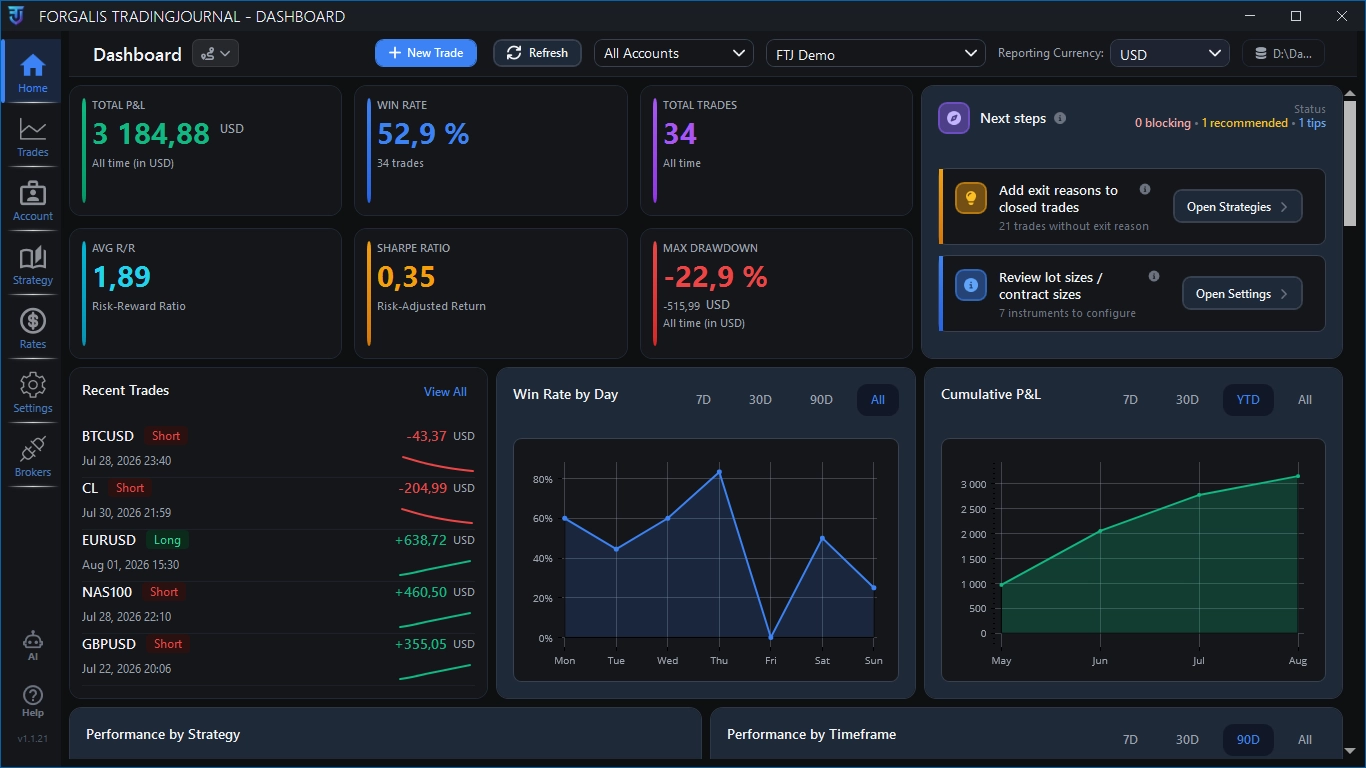
See high-level performance, recent activity and the next review tasks from one desktop workspace.
A local-first trading journal for Windows
Review every trade with more context.
Bring trade history, screenshots, notes, strategies and performance data into one focused Windows workflow, with fast local access and your journal stored on your device.
Start with the free Demo. Upgrade to Full Access only if the complete feature set fits your review process.

Journal database on your PC
Local-first review workflow
Native Windows app
Local-first desktop workflow
Broker and file imports
cTrader, MT4, MT5 and CSV
Structured context
Screenshots, notes and reusable fields
Performance review
Filters, statistics and charts
New free browser tool
Meet Forgalis Trade Analyzer.
Import supported trading history, understand your results and compare trading periods. See the actual trades behind each finding — without creating an account or connecting a broker.
MT4, MT5, selected cTrader reports, FTJ and supported CSV formats. File processing stays in your browser.
TRADE ANALYZER
01 / IMPORTTrading historySupported files
02 / REVIEWPerformance & evidenceResults you can inspect
03 / COMPAREPeriod A vs Period BChoose dates and inspect trades
Import or log trades
Use the trade history you already have.
Import supported broker history, bring in files or enter trades manually. Then add the review structure and context you need around each trade.
- 1Bring in the execution history
Use cTrader, MT4, MT5, CSV or manual entry depending on the data available to you.
- 2Link it to the right journal account
Keep broker accounts and journal accounts organised without mixing the review context.
- 3Continue the review inside FTJ
Edit the record, add context and analyse it through the same Windows workflow.

The result plus the reason
Keep the trade data and review context together.
Broker data records what happened. FTJ lets you keep that result together with the setup, session, timeframe, screenshots, notes and exit reasoning behind the trade.
- Edit and complete imported trade records
- Keep risk/reward and P/L review close to the trade
- Add screenshots and written reflection
- Reuse consistent strategies, confluences and exit reasons
Build a repeatable review language
Turn setups and confluences into reusable journal structure.
Define strategies once, attach consistent confluences and use the same language across trades. That makes later filtering and comparison more useful than free-form notes alone.
StrategyConfluenceExit reasonMistake

Review performance
Move from isolated outcomes to repeated patterns.
Use the dashboard, trade history, filters and charts to inspect more than the latest win or loss.
Inspect win rate, risk/reward, drawdown and other measures supported by the available trade data.
Narrow the journal by the fields that matter to your process and return to individual records when a pattern needs context.
Trading journal vs spreadsheet
Use the simplest system that still supports your review.
A spreadsheet is a sensible starting point. A dedicated journal becomes more useful when screenshots, structured fields, imports and recurring analytics become part of the process.
Compare the workflows- You only need a small number of columns
- You enjoy maintaining formulas and dashboards
- Your process does not require attached screenshots
- You want screenshots and notes connected to trades
- You need repeatable review fields and imports
- You prefer built-in review statistics and charts
Learn before committing
Use the tutorials and free tools alongside the app.
See the workflow in practice, or use the browser calculators without creating an account.
Product walkthroughsForgalis TradingJournal tutorials
Setup, logging, imports, screenshots, dashboard review and broker connections.
Explore tutorials No signup requiredFree trading calculatorsPosition sizing, risk/reward, expectancy, profit factor, drawdown and more.
Explore trading tools Deeper contextGuides and comparisonsWindows journals, local-first workflows, screenshots, spreadsheets and integrations.
Explore resourcesCommon questions
Know what the product is and what it is not.
FTJ is a Windows trading journal for post-trade review. It does not place trades, promise better results or replace your broker platform.
Is Forgalis TradingJournal cloud-based?
FTJ is local-first and centres the journal database on your Windows PC. Downloads, updates, licensing and optional integrations may still require internet access.
Which import workflows are supported?
Current workflows include cTrader, MT4 and MT5 broker history, plus CSV file imports where supported by the available data.
Can I enter trades manually?
Yes. FTJ supports manual trade logging as well as import workflows, so the journal is not limited to one broker or platform.
Is there a free Demo?
Yes. The free Demo lets you test the FTJ workflow with your own journal setup. Full Access is the only paid product level and unlocks the complete available feature set.
Start with actual trades
See whether the workflow makes your review easier to maintain.
Install the free Demo, add or import a small set of trades and judge FTJ against the review process you already use.