
Direct entry
Manual logging
Create trades manually when no import is available, when you want full control over the record or when you are journaling a setup independently of a broker connection.
Trading journal for Windows
Keep the trade, the context and the review together. Import supported broker history or log trades manually, then add screenshots, notes, reusable review fields and performance analysis in a local-first Windows workflow.
Install the free Demo from Microsoft Store. Full Access is purchased separately and activated inside the installed app.
Not sure about your broker? Find your broker and platform.
Capture the record
FTJ supports several ways to build a journal. Choose the method that matches how your broker or existing records expose the data.
Direct entry
Create trades manually when no import is available, when you want full control over the record or when you are journaling a setup independently of a broker connection.
Connected history
Bring supported broker history into FTJ and then add the review context that execution records alone do not contain.
Existing records
Use supported file-import workflows when your history is available as a CSV broker export rather than through a direct connection.
After import
Edit the resulting trade record, add screenshots and written reflection, and organise it with the same fields you use across the rest of your journal.
The result plus the reason
A broker statement is useful for fills, quantities, prices and realised results. A trading journal becomes more useful when the decision-making context stays connected to that record.
Keep chart screenshots close to the trade instead of across separate folders.
Record what you noticed, followed or missed while the trade is still clear.
Use consistent labels so repeated behaviour becomes easier to filter and compare.
Review performance
FTJ combines structured trade history with filters, statistics and charts so you can inspect more than the result of the latest trade.
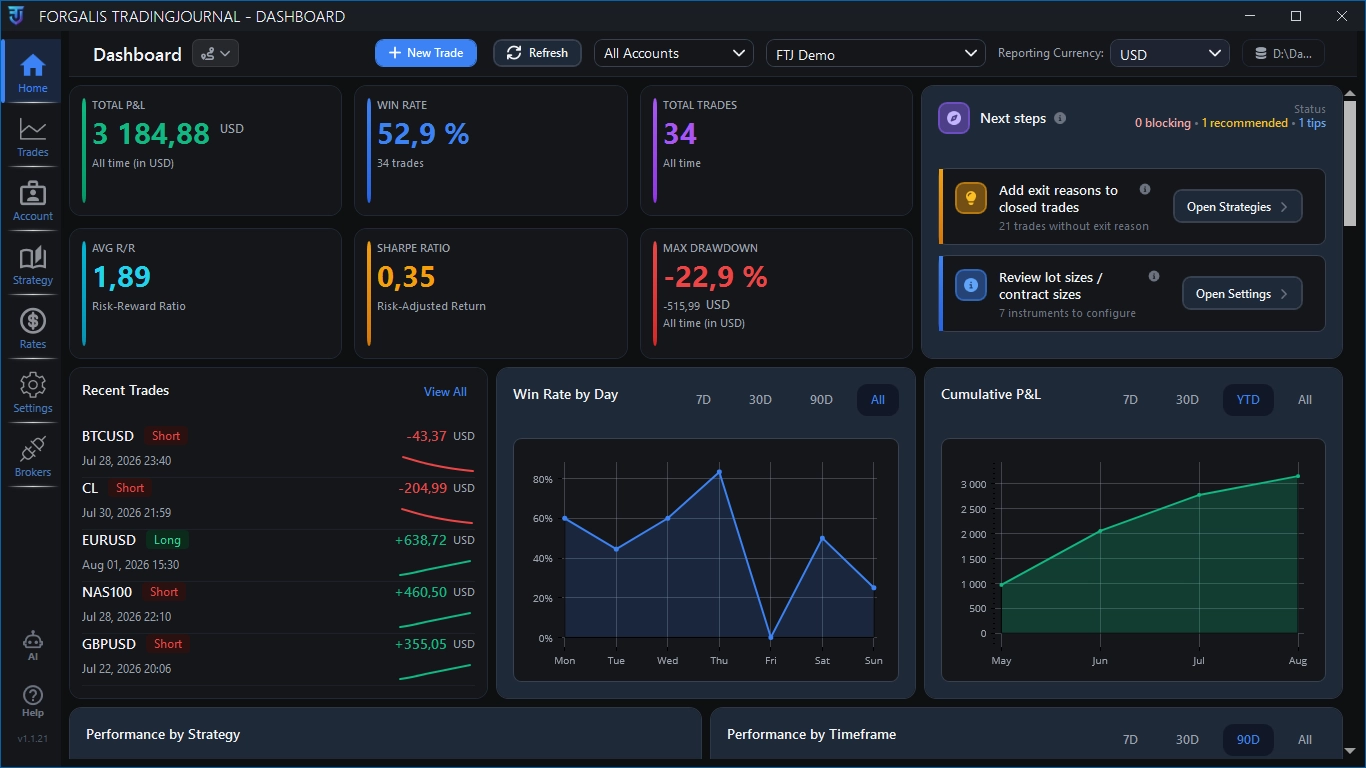
Review high-level performance measures and recent trade activity from one desktop workspace.
Inspect measures such as win rate, risk/reward and drawdown where the available trade data supports them.
Narrow the journal by the fields that matter to your process instead of maintaining separate spreadsheets.
Return to individual records when a statistic or chart reveals something worth reviewing in detail.
Local-first by design
FTJ keeps the journal database and day-to-day review workflow local-first. That gives the desktop app a different role from a browser journal whose main workspace lives in a remote account.
Demo and Full Access
The free Demo supports real journaling with documented limits. Full Access removes those limits without replacing the installed app or your existing local journal.
Demo
Install FTJ from Microsoft Store and test it with real journal records. Manual trades and imports can start while the journal contains fewer than 20 persisted trades.
Full Access
Full Access removes the Demo restrictions. Purchase through the verified checkout, then activate the licence key under Settings → Licence in the installed app.
A practical fit check
FTJ is built for traders whose journal has moved beyond a small result table. A spreadsheet can still be the right tool when the workflow is simple and you enjoy maintaining it yourself.
Compare journal and spreadsheet workflowsExternal coverage
Both articles are paid placements from the same publisher network.
Product questions
FTJ is a post-trade journal and review application. It is not a broker, an execution platform or a promise of better trading results.
No. FTJ is designed for trade logging and post-trade review. Trading and order execution remain with your broker or trading platform.
Current supported broker-history workflows include cTrader, MetaTrader 4 and MetaTrader 5. The fields available in FTJ depend on what each source provides.
Yes. You can log trades manually and use supported CSV import workflows when direct broker history is not the right source.
The journal workflow is local-first and centres the database on your Windows PC. Installation, updates, licensing and optional integrations may still use internet access.
No. The free Demo supports real journaling. New trades and imports can start below 20 persisted trades, while review, analytics, export, deletion, notes and self-reflections remain available after the limit. Full Access removes the Demo restrictions.
Start with actual trades
Install the free Demo, add or import a small set of trades and judge FTJ against the review process you already use.